Instructions to
allow popup windows from extend.fedex.com
1.
Internet Explorer 7.0 – Windows XP
1.1. Open Internet
Explorer.
1.2. On the Tools button (Right
hand side Lower Toolbar button), point to Pop-up Blocker, and then click Pop-up Blocker Settings.
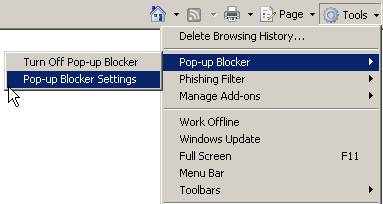
To see pop-up windows from groundforce, type extend.fedex.com in the Address of Web site to allow
box, and then click Add.

1.3. Press Close Button
to exit.
If you have any
questions, please call the FedEx HelpDesk at 1-800-HELPMIS (1-800-435-7647).